
Location Dwell time tracking
Used to track the amount of time a trailer has been idle in a specific location. It will:
- Optimize Yard Operations: Strategically plan dock/yard spotting moves based on aging trailers
- Improve Visibility: Identify trailers that:
-
- have goods that could waste
-
- should be set out-of-service
-
- are no longer in the yard
-
- incur demurrage or detention charges
- Increase Efficiency: Reduce time tracking lost or forgotten trailers for an overall more efficient yard
How it works
On the Inventory page, you will see two new columns: In Location Since and Location Dwell Time
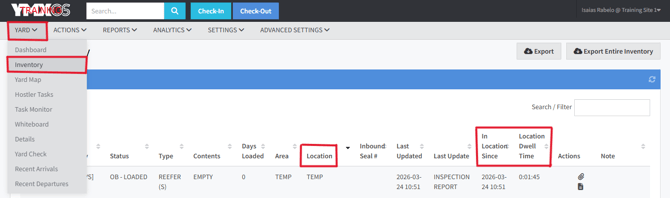
The In Location Since column tells you the specific date and time that the trailer was moved to that location. While the Location Dwell Time column is a calculation of how long that trailer has been in that location.
The example below shows trailer #324502 is currently in location Temp, and it was moved there on Mar 24, 2026 at 10:51 AM. It has been there for 1 hour and 57 minutes.

Let´s move that trailer somewhere else and see how the columns will display that information!

Things to keep in mind!
- It´s not just the move itself (or schedule move, complete move) that will reset the clock on the Location dwell time column, but anytime the location changes.
- The two columns are reset based on the Location field changing, regardless of the transaction. In this example a Move was used but had the Location been changed using the Edit or any other function, the same reset would happen.
Please, reach out to product_support@ymxlogistics.com if you want that new feature added to your site.