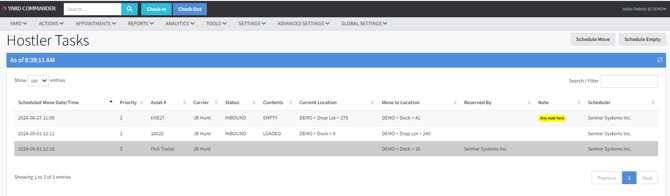
The Hostler Tasks page is typically used by drivers, often with access to mobile devices. It serves as a “to-do list”, showing the current location of the asset, the location to be moved to and the data and time the move is required. The list will update in real time as trailers are scheduled to be moved. Once a trailer is moved it will drop from the list. The list will auto-refresh.
By going on Yard >> Hostler Tasks, you´ll see all moves scheduled as bellow:
A driver will need to click on one of the scheduled moves and reserve:
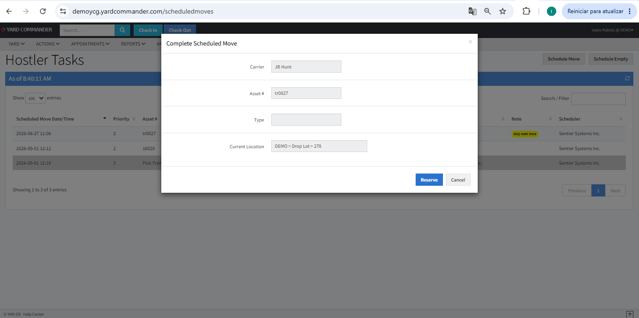
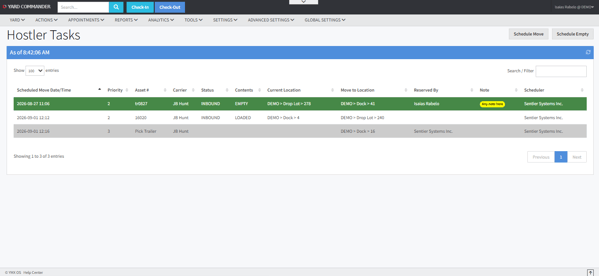
Once the move is reserved, it will not be available to be reserved by anyone else. The reserve function is mainly used to prevent different drivers to pick the same move.
The reserved move will be listed on the hostler taks list in green and with the driver's who reserved name.
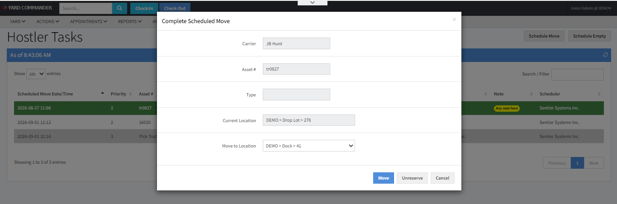
The driver will need to click on the reserved move once again, and hit the move button once the task is completed.